
Turn product photos into
fully optimized Shopify products in minutes.
CataPro AI Studio automatically groups your product photos, writes SEO-ready titles and descriptions, and enhances images so you can ship new collections 10× faster without hiring a content team.
Add watermarks to all your product images—unlimited and free
Protect your product images with professional watermarks. Bulk process unlimited images across all your products with simple clicks. No credits, no subscription, no credit card required. Completely free for all Shopify stores.
A complete product creation pipeline in three steps.
CataPro AI Studio plugs into your Shopify catalog and handles the busywork: grouping, writing, and image enhancement. You stay in control of what gets published.
Drop your product photos
Upload a folder from your photoshoot or supplier. We detect which images belong together and pre-group into products.
Let AI build the product
Titles, descriptions, tags, SEO metadata, and alt text are generated based on your brand tone and product visuals.
Review & publish to Shopify
Approve in bulk or tweak specifics, then sync everything directly into your Shopify products with one click.
Four powerful workflows for your catalog.
Start wherever your catalog is today: raw photos, existing products, or unpolished imagery. Each workflow is designed to save hours of manual updates.
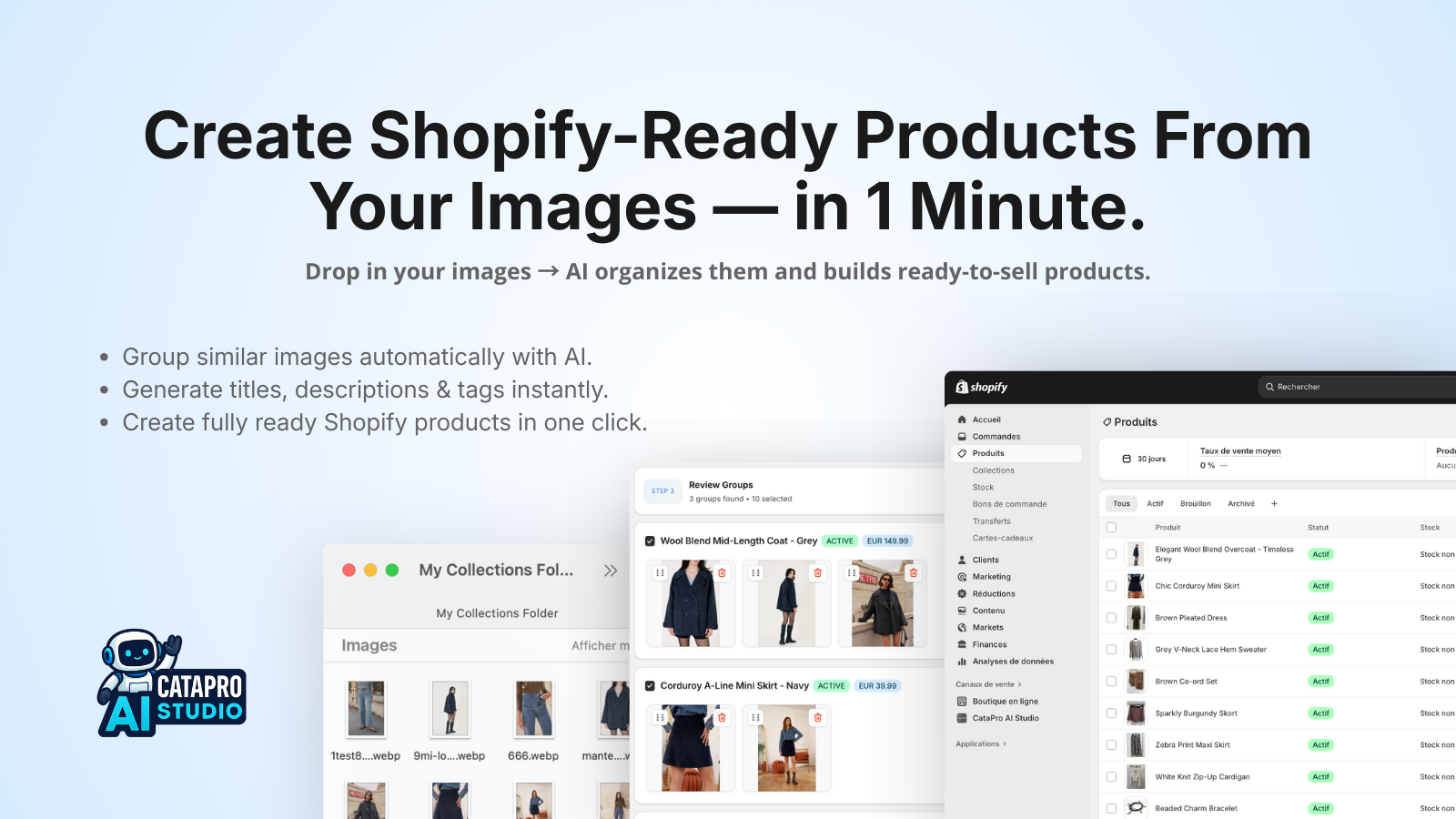
Turn Raw Image Folders Into Ready-to-Sell Shopify Products — Automatically With AI
Watch how CataPro AI Studio transforms your product photos into fully optimized Shopify products in minutes.
From messy folders to grouped Shopify products.
Perfect for new collections, supplier drops, or photo shoots. AI groups images into products, picks a primary image, and sets the rest as gallery photos.
- • Group by visual similarity, color, and angle.
- • Automatically detect variants when possible.
- • One-click create products in Shopify.
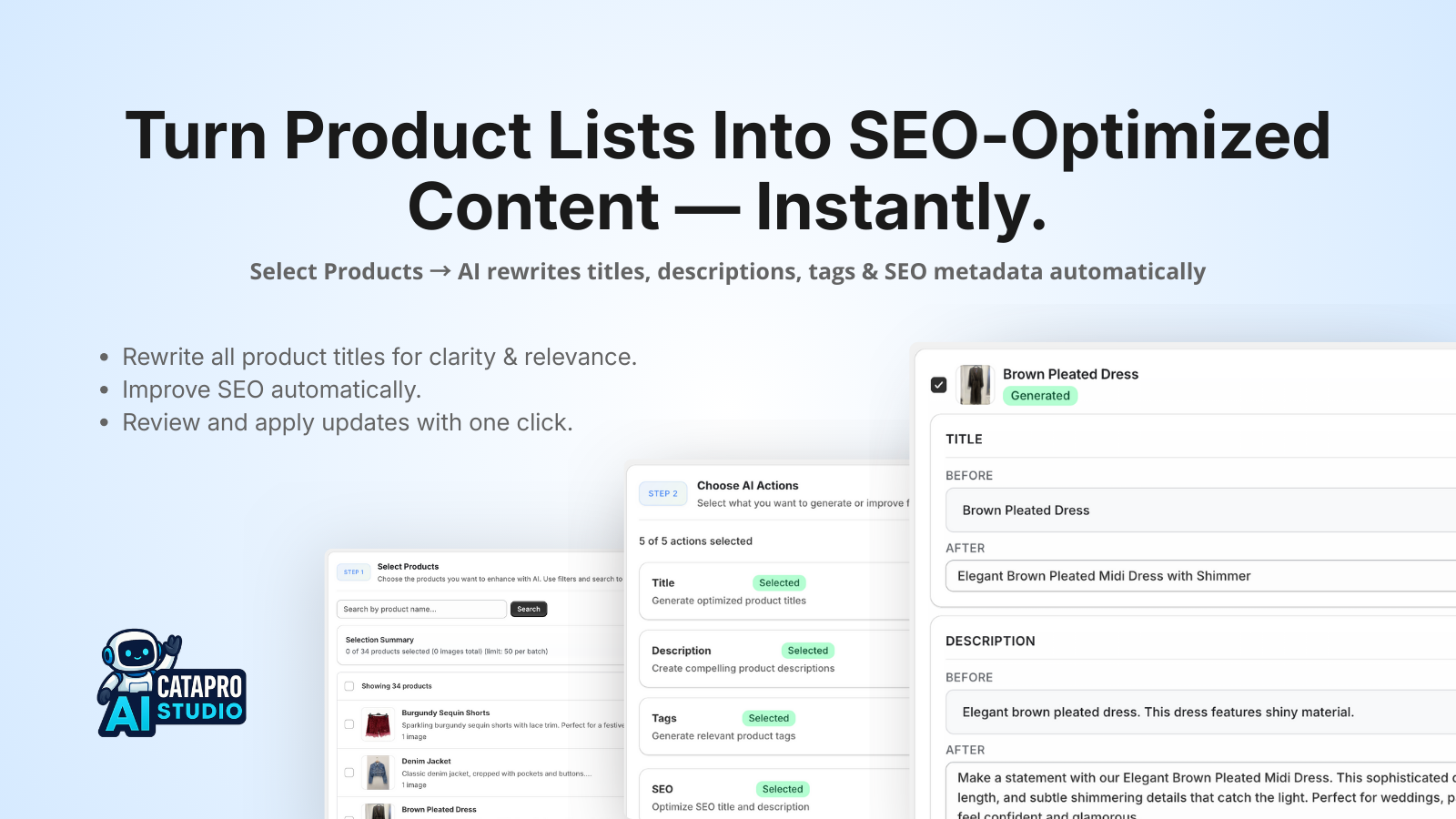
Upgrade existing product pages in bulk.
Choose products and let AI rewrite titles, descriptions, tags, SEO, and alt text while keeping your brand voice.
- • Bulk-select products by collection or filter.
- • Preview AI suggestions before applying.
- • Apply changes in a single update step.
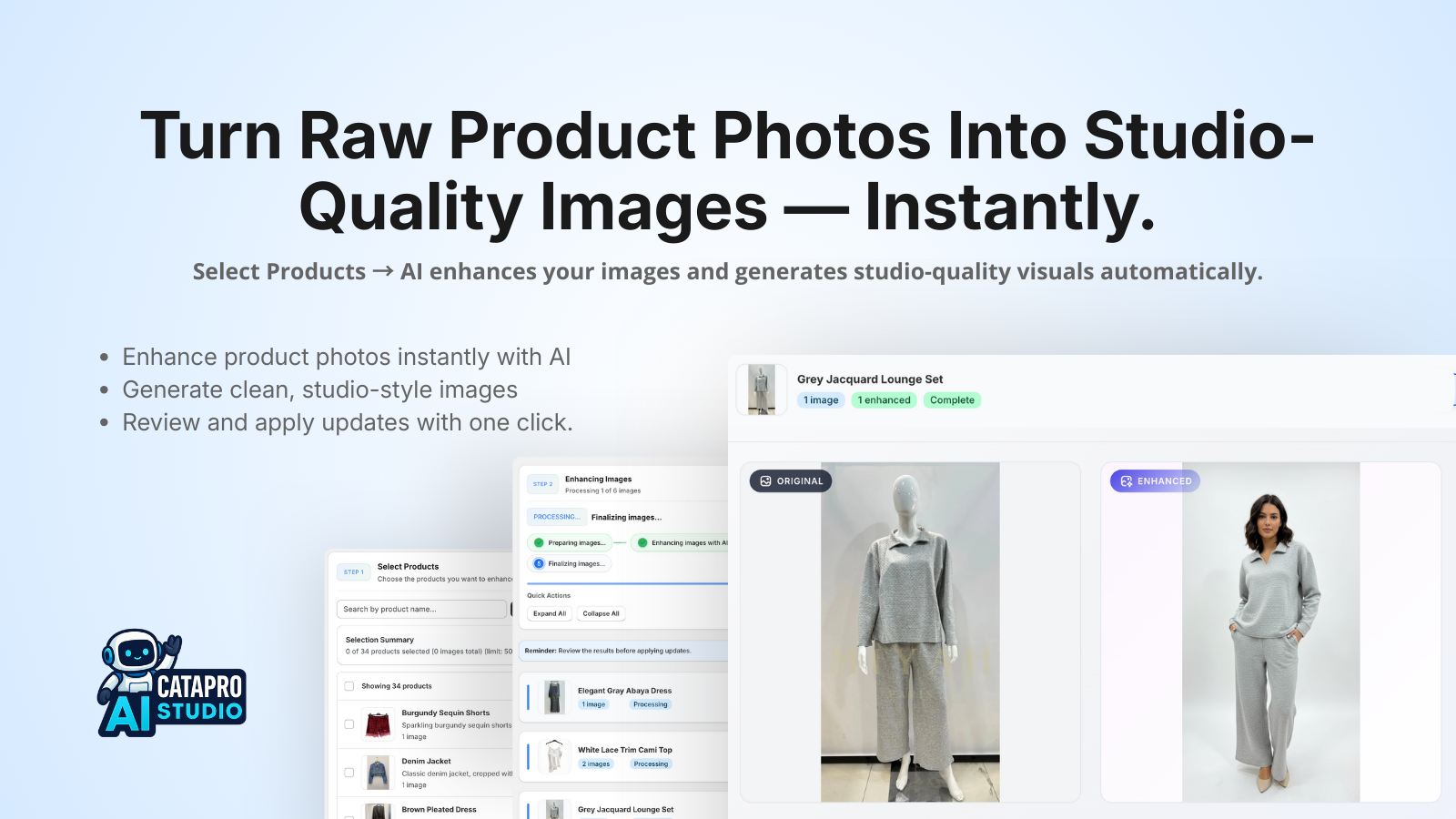
Turn raw photos into store-ready visuals.
Clean up lighting, improve backgrounds, and get consistent imagery that actually matches your brand.
- • Enhance multiple products in one batch.
- • Custom prompts for your brand aesthetic.
- • Optional watermark or logo overlays.
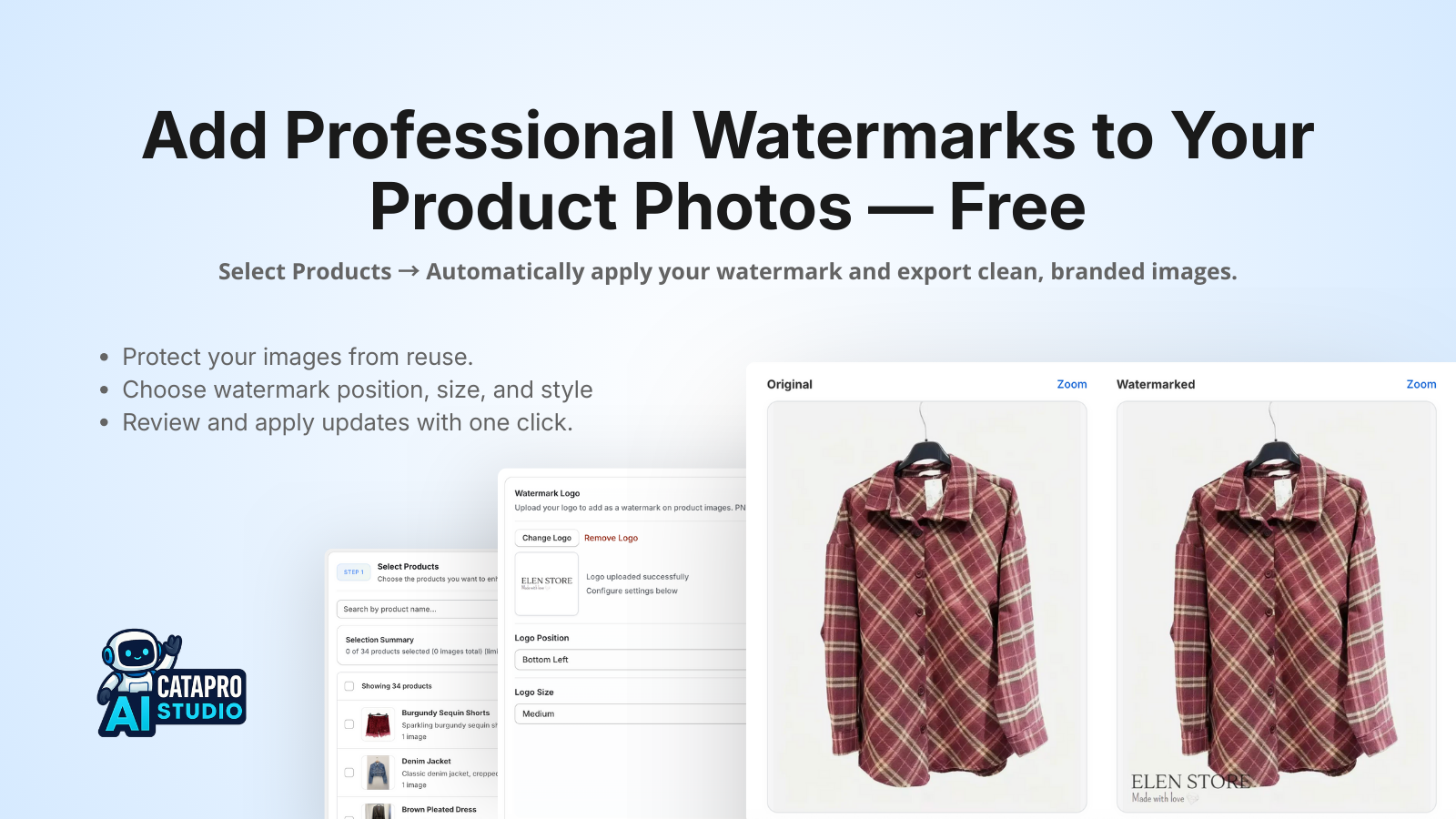
Add watermarks to all your products—unlimited and free.
Protect your product images with professional watermarks. Process unlimited images across all your products with simple clicks. No credits, no subscription, no credit card required.
- • Bulk process all your product images at once.
- • Smart positioning for optimal placement.
- • Unlimited—completely free, no credits needed.
Built for teams that care about speed and quality.
Agencies, brands, and solo founders use CataPro AI Studio to ship large catalogs without sacrificing polish.
Launch collections in days, not weeks
Replace spreadsheets and back-and-forth emails with one controlled workflow that handles hundreds of products.
On-brand, SEO-aware content
Your products look like they were written by a human copywriter—just much faster and more consistent.
Visuals that actually sell
Cleaner backgrounds, sharper lighting, and consistent framing across your catalog make your store look premium.
Agency-friendly workflows
Use it to deliver complete product setups to your Shopify clients and get approval in a single review pass.
Safe to iterate
Preview changes, keep original content, and apply updates only when you're satisfied. You stay in control.
Fits into your existing stack
No migration required. Connect your Shopify store and start with any slice of your catalog.
Why CataPro AI Studio Stands Out
CataPro AI Studio delivers time savings with fast processing speed, intelligent automation, and a complete end-to-end workflow designed for modern Shopify stores.
⚡ AI Performance & Processing Speed
CataPro AI Studio is built for speed, delivering results in seconds with optimized parallel processing.
Image Grouping Speed (50 Images)
👉 CataPro's grouping engine uses high-efficiency embedding models + parallel similarity clustering.
AI Product Creation Speed (30–35 Products)
👉 Batches metadata generation and optimizes Shopify write calls for maximum performance.
SEO Enhancement (100+ Products)
👉 Powers through titles, descriptions, tags, SEO titles/descriptions, and alt text instantly.
Updating Products in Shopify (100 items)
👉 Uses optimized parallel API writes that stay within Shopify rate limits while maximizing throughput.
🧠 Feature Overview
| Feature | Typical AI Tools | CataPro AI Studio |
|---|---|---|
| AI image grouping | Not commonly available | Advanced, highly accurate grouping |
| Create products from images | Limited availability | Full product creation pipeline |
| AI content generator | Basic text output | SEO-optimized, conversion-focused content |
| Bulk SEO optimization | Partial | Complete multi-field SEO suite |
| AI image enhancement | Varies by app | Studio-quality lighting & cleanup |
| Watermarking | Sometimes included | Built-in, customizable watermarking |
| Bulk processing | Often single-threaded | Ultra-fast parallel processing engine |
| Referral system | Rare | Integrated affiliate rewards |
| Pricing model | Standard | Flexible credits + subscriptions |
| UI experience | Mixed | Clean, Shopify-native design |
CataPro AI Studio is designed as an end-to-end catalog automation platform, combining AI grouping, product creation, SEO optimization, and image enhancement into one seamless workflow.
🧩 Why CataPro's Technology Stands Out
1. Ultra-Fast AI Engine
Built with parallel image processing, vector embeddings, and optimized batch LLM inference to deliver results in seconds.
2. Complete Product Workflow
Instead of focusing on a single task, CataPro supports the entire product lifecycle from start to finish.
3. Professional Image Enhancement
Lighting correction, background cleanup, and color consistency for studio-quality visuals from everyday photos.
4. High-Quality AI Product Content
SEO-ready, structured, conversion-oriented descriptions, titles, tags, and alt text that help stores improve product discoverability and sales.
CataPro AI Studio is designed to help merchants move faster and automate catalog work.
From grouping images to writing SEO content to enhancing product photos, CataPro delivers polished, high-quality listings that publish directly to Shopify with confidence.
Upload photos → Let CataPro do everything → Publish.
No team required. Fully automated. Lightning fast.
Frequently Asked Questions
Does the app automatically create products in my Shopify store?+−
Yes — after AI groups your images and generates product suggestions, you review everything. Nothing is created automatically without your confirmation. Once approved, the app creates or updates products directly in Shopify.
Do you store my product images or content?+−
No. We do not store any product images, descriptions, titles, or customer data. Images are processed temporarily and immediately deleted after enhancement. We only store: shopId + shopDomain for Shopify API authentication.
How does the AI image enhancement work?+−
The AI improves sharpness, lighting, background quality, removes noise, and makes product images look professionally photographed. Enhancements are optional — you choose which version (original / enhanced / both) to apply for each image.
Can I reorder the images before creating the product?+−
Yes. You can drag & drop to reorder all selected images. The first one becomes the featured image in Shopify. You have full control of the final image order before publishing.
What happens if the AI groups images incorrectly?+−
You can manually adjust grouping before creating products. You can move images between products, remove images, or enhance them independently.
Are there limits on how many images I can process?+−
Your batch size depends on your current plan. The app will warn you if you exceed your product-per-batch or image-per-batch limit. You can upgrade anytime from the “Plans & Billing” page.
How does the credit system work?+−
Each enhancement or AI action consumes credits. You can recharge credits anytime. Your balance and cost breakdown are displayed in real time.
Does the app support bulk watermark removal?+−
Yes. The app includes unlimited watermark removal at no cost. This feature is free and does not use credits.
Will the app overwrite my existing products?+−
No. You choose whether to create new products or update existing ones. The app only updates what you explicitly approve.
Is this app approved and safe for Shopify stores?+−
Yes — the app follows Shopify’s security, data protection, and UX guidelines. No sensitive customer or product information is stored. All AI processing is secure and compliant.
What if an image enhancement fails?+−
Failed images automatically fall back to the original version. You’ll see clear warnings and can retry enhancement individually.
Can I choose which images to keep or remove?+−
Yes — each image can be marked as: Original, Enhanced, Both, or Remove. You have 100% control before creation.
Can I undo changes after creating products?+−
Once products are created or updated in Shopify, they can't be undone automatically. However, you can edit or delete them directly inside your Shopify admin at any time.
How accurate is the AI when grouping images into products?+−
Our AI uses similarity detection and feature mapping to group images. It’s highly accurate for clothing, jewelry, accessories, furniture, beauty, and most categories. You can always correct the grouping manually before finalizing.
Does the AI generate titles, descriptions, or variants?+−
Yes. AI can generate product titles, descriptions, tags, and metadata automatically. You can also instruct the AI using custom prompts such as: “Write in French,” “Short bullet points,” or “Highlight materials.”
What file formats are supported for image uploads?+−
We support JPEG, JPG, PNG, and WEBP. HEIC files are recommended to be converted first. Large images are automatically optimized for faster AI processing.
Why are some images stuck in “Processing”?+−
This usually means the image is in AI queue or retrying after a failed enhancement attempt. Most images complete within seconds. If it takes longer than 2 minutes, you can click “Retry enhancement."
Do product content enhancements count as credits even if I don't use them?+−
Yes. Credits are consumed when the AI enhancement is generated because the AI processing cost occurs at that moment — not when you choose the result. However, failed enhancements never cost credits.
Can I enhance images without creating products?+−
Absolutely. You can upload any batch of images, enhance them, reorder them, and download them or choose not to create any products at all.
Is the AI content original and safe for SEO?+−
Yes. All AI-generated titles and descriptions are unique, professionally written, and optimized for e-commerce SEO. You may request tone changes, languages, or specific keyword styles through custom prompts.
Ready to see your catalog build itself?
Connect your Shopify store, upload a set of product photos, and watch them turn into fully merchandised product pages in a single workflow.